Key Takeaways
- Track AI visibility around your buyer’s journey. Group prompts into awareness, consideration, and decision stages to identify where your brand enters—or drops out of—the buying process.
- Capture AI discovery through identifiable referrals and buyer self-reports. Save available referral data and add an AI-assistant option to “How did you hear about us?” forms, then carry those signals into your CRM.
- Keep brand-level visibility separate from lead-level attribution. A mention rate describes performance across tracked prompts; it cannot tell you which prospect saw an AI recommendation.
- Compare visibility trends with pipeline from tagged leads. Bring both into a shared report, while keeping their meaning distinct. Trends moving together provide context, not proof that increased visibility caused a deal.
- Build a regular review around commercial outcomes. Check tagged leads and competitive changes weekly, then review qualified opportunities and revenue monthly. Report what is traceable and clearly label what remains directional.
Most RevOps teams we talk to have two dashboards open at the same time and no way to reconcile them – one shows AI visibility, mentions across ChatGPT, Gemini, and Perplexity, share of voice against competitors, sentiment trending up or down and the other shows pipeline, opportunities by stage, forecast category, close rate by source.
Nobody on the call can say whether the two are related. The visibility numbers move independently of the pipeline numbers and after two quarters of that, finance stops asking about the first dashboard altogether.
That is not a tooling problem – it is a wiring problem and it is fixable.
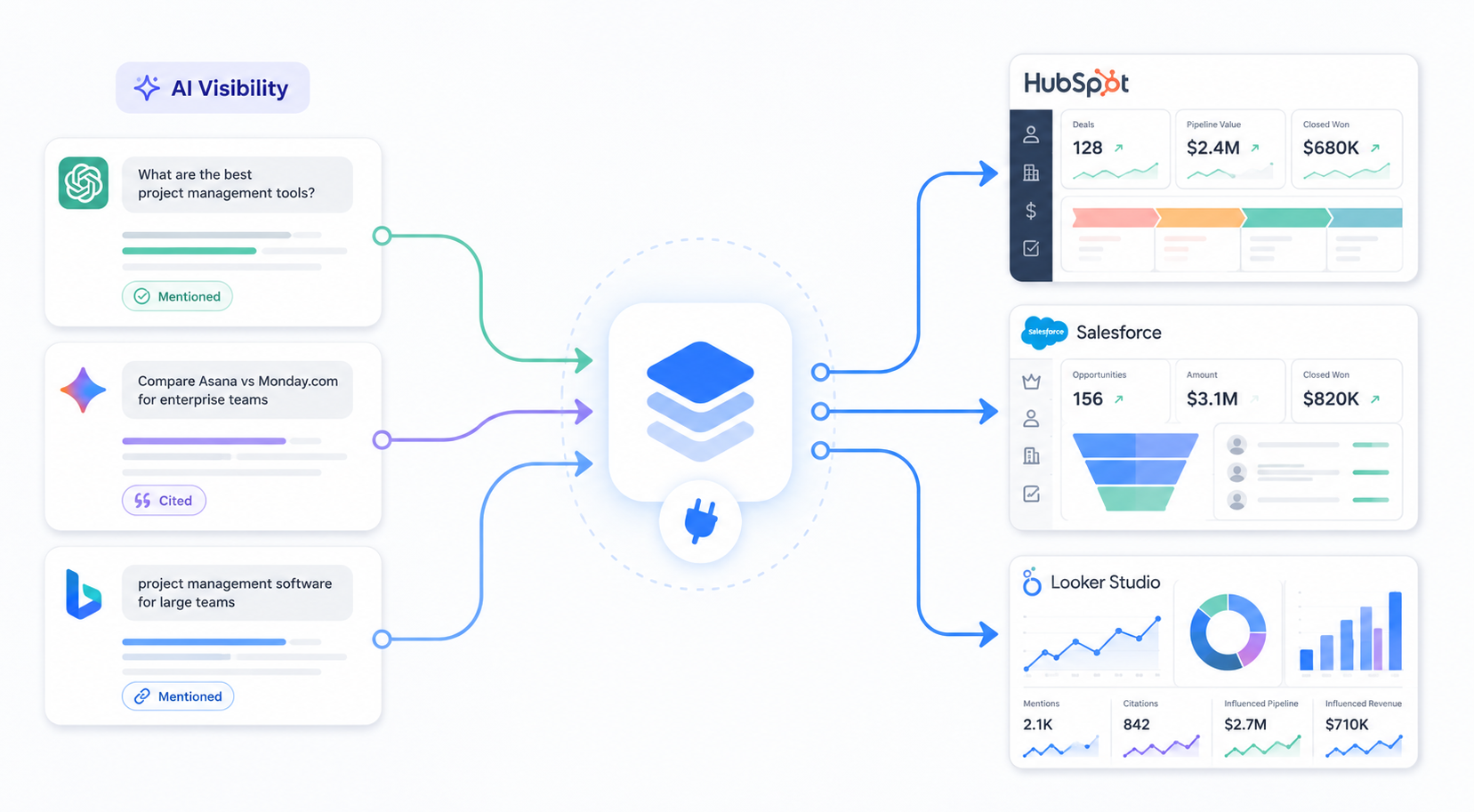
Connecting AI visibility data to your CRM pipeline means treating AI mention, citation and sentiment data as a first-class data source inside HubSpot or Salesforce joined to the same contact and account records your sales teams already work from. With this, that visibility trends can be measured against pipeline creation and win rate rather than sitting in a separate reporting silo.
Done correctly, this turns AI search visibility from a marketing vanity metric into a revenue input finance can actually interrogate.
Why AI Visibility Sits Outside the Pipeline Conversation Today
The disconnect exists because AI visibility tools and CRM systems were never designed to talk to each other. A visibility platform tracks a brand across prompts and engines while a CRM tracks people and deals. Nothing in either system’s default configuration assumes the other exists and most teams end up screenshotting a chart from one and pasting it into a slide next to a chart from the other.
The deeper issue is that a large share of the influence AI search now exerts on a buying decision never touches a form field. Forrester’s research on B2B buying estimates that 70 to 80% of the evaluation process now happens before a buyer ever engages a seller and that research predates most of the current wave of AI-assisted research.
A buyer who asks ChatGPT to compare category options reads three analyst summaries and shortlists two vendors has already done the work your funnel used to attribute to a demo request or a comparison page visit. None of that shows up as a tracked touch because none of it happened on a page your analytics can see.
Similarweb’s traffic data shows ChatGPT is now a top-ten referral source for major B2B research destinations sending measurable click volume to sites like Forrester and Gartner, the kind of research a buying committee reads before contacting a vendor. That referral pattern is a proxy for something CRM systems were never built to see and this is what GeoRankers refers to as the citation-to-close gap – the interval between the moment an AI engine cites or recommends a brand and the moment that influence becomes a traceable, contact-level event inside a revenue system.

Attribution models were built to close the gap between clicks and revenue – nobody built one to close the gap between a citation and a contact record which is exactly why most RevOps teams cannot currently answer a simple question – whether AI visibility is producing pipeline or just producing charts.
A Practical Workflow for Wiring Visibility Data Into Revenue Systems
None of this requires a data engineering team or a six-month integration project – it requires four things done in sequence and a review cadence that keeps them honest.

Step 1 : Define Your Prompt Set by ICP Stage
The prompts you track determine everything downstream and therefore, this step deserves more care than most teams give it. A prompt set built around generic category terms tells you almost nothing about pipeline impact while a prompt set mapped to how your specific ICP actually researches stage by stage tells you where visibility is doing revenue work and where it is not.
Gartner’s survey of B2B buyers found they now use an average of seven information sources during a purchase and 45% reported using generative AI primarily to gather information on vendors and products. That number matters because it means a single “brand awareness” prompt cluster is not enough. Buyers are asking different kinds of questions at different points and each question type maps to a different stage of the pipeline you are trying to influence.
A workable structure looks like this –
- Awareness stage – category-level prompts a buyer asks before they know your name. “What tools help B2B SaaS companies track brand visibility in AI search.” No product names, no comparisons.
- Consideration stage: comparison and shortlist prompts. “GeoRankers vs alternatives for AI visibility tracking” or “best tools for monitoring brand mentions in ChatGPT.” This is where competitive share of voice starts mattering more than raw mention count.
- Decision stage: validation and objection prompts. “Does GeoRankers integrate with Salesforce” or “is GeoRankers worth it for a Series B SaaS company.” These prompts correlate most tightly with deals already in your pipeline, because a buyer only asks them once a vendor is under real consideration.
A RevOps lead at a mid-market marketing automation company we spoke with built exactly this structure and found something counterintuitive – their decision-stage mentions were strong but their consideration-stage share of voice against two competitors was nearly invisible. Pipeline was still closing but new opportunity creation had started to slow down before anyone noticed because nobody was watching the middle of the funnel from an AI visibility angle.
Think of the three stage prompt set as a weather station rather than a single thermometer – one reading tells you the temperature right now, three readings across the funnel tell you which direction the front is moving.
Read — The Hidden Metrics Behind AI Discovery That SEO Tools Cannot Show You for a deeper breakdown of which discovery metrics actually correlate with pipeline behaviour.
Step 2 : Capture the Two Signals That Are Actually Traceable to a Lead
This is the step where most of these projects overreach by trying to tag individual CRM records with a brand-level visibility score that has nothing to do with that specific records – you can skip that entirely.
Two mechanisms genuinely produce lead level data today and both are narrower than a full attribution model which is exactly why they hold up under scrutiny.
- Referrer-based tagging – Some AI engines pass a referrer when a user clicks through to your site. Perplexity does this fairly reliably while ChatGPT largely does not which is a real limitation. Where a referrer is available, capture it at the landing page with a hidden form field or UTM parameter and sync it to a custom property on the Contact or Lead object like first_touch_source = perplexity.ai in both HubSpot and Salesforce. This produces a small and real number that you can trace to a specific AI engine.
- Self-reported attribution – Add an option like “An AI assistant such as ChatGPT or Gemini” to the “how did you hear about us” field on demo request and signup forms. This is a blunt instrument, buyers do not always remember accurately but it is the same method most of the current AI visibility platforms lean on for anything resembling attribution and it captures the ChatGPT driven leads that referrer tracking misses.
Both of these populate real fields on real Contact or Lead records through HubSpot’s Contacts API or Salesforce’s REST API using a middleware layer like Zapier, Make, or Workato if the team wants to avoid custom code. What does not belong in this step is a brand-level visibility score written onto individual Account records since there is no per-account visibility data to write there in the first place.

Step 3 : Blend Aggregate Visibility Trends With Tagged Pipeline in Looker Studio
Neither HubSpot nor Salesforce has a native Looker Studio connector from Google and both require a partner connectors like Supermetrics, Porter Metrics or Coupler.io for HubSpot, and Xappex, Coupler.io or Skyvia for Salesforce, or, routing the data through Google Sheets or BigQuery first. That extra step is a real setup cost worth budgeting for before promising a live dashboard to leadership.
Once the data is flowing, the report itself should keep two things visibly separate rather than blending them into one misleading total. The first is the aggregate visibility trend, mention volume and share of voice by ICP-stage prompt cluster, tracked over time at the brand level and the second is tagged pipeline – the referrer-tracked and self-reported leads from Step Two along with whatever opportunities and revenue those specific tagged records produced.
A monthly view looks something like this –
| Month | ICP Stage (Aggregate) | AI Mentions | Share of Voice | Tagged Leads (Referrer + Self-Reported) | Pipeline From Tagged Leads |
| April | Consideration | 190 | 22% | 6 | $38,000 |
| May | Consideration | 240 | 27% | 9 | $54,000 |
| June | Consideration | 310 | 34% | 14 | $91,000 |
Step 4: Set a Review Cadence
The last and most important step is setting a cadence. A dashboard nobody checks stops getting used within a month or two, no matter how well it is built.
Keep it to two check-ins – a weekly review run by RevOps or growth that stays tactical. Just 15 minutes to look at tagged leads, share of voice against named competitors and any prompt that changed suddenly.
Then , a monthly review with sales and marketing leadership to look at the bigger trend lines from Step Three. You can expect a lag of one to two months between a change in visibility and a change in tagged leads since buyers spend real time researching with AI before they ever show up in the CRM. If both numbers move together right away, check the data before you trust it.
The monthly review is also where the following questions shows up –
- Is this creating new pipeline or just describing pipeline that would have shown up anyway? A lead with a Perplexity referrer or someone who says they found you through ChatGPT is proof the funnel did not produce that lead on its own. It is a small number but that indicates where your users are finding you.
- What is the cost per qualified opportunity? Calculate this only from the tagged lead subset and say clearly that it undercounts real influence. A small, honest number holds up better than a bigger one that falls apart the first time someone asks how it was calculated.
- What happens to pipeline if we cut this? Three or four months of trend data gives a directional answer. For a stronger one, pause GEO content for a set period and watch whether visibility and tagged leads both drop and then start again. That is closer to a real test than any dashboard can offer on its own.
What This Actually Changes
There is no single AI visibility score you can drop into a CRM record for each prospect – that data does not exist. What you can get instead are two honest things – a small number of leads you can actually trace to an AI engine through referrer tags or self-reported answers, and, a bigger trend line showing how your brand’s overall visibility moves over time. Put those two next to your pipeline numbers on a regular schedule and you have something real to bring to a review even if it is smaller and more careful than the clean attribution story most dashboards try to sell.
Having said that, this does not replace the rest of your RevOps work – intent data, engagement scoring and pipeline forecasting still do most of the work. What this adds is one more input which is clearly labeled for what it can and cannot prove.
The teams that get the most out of this are not the ones with the cleanest-sounding attribution story but are the ones who say plainly what is proven and what is still directional , and , who build their reporting to match.
If your team is still treating AI visibility as a separate report from pipeline, what would even this smaller, honest version show you right now?
GeoRankers tracks the aggregate side of this workflow – how your brand shows up model by model, how you compare to named competitors, which of your own pages are driving that visibility, location-specific visibility, and where the gaps are. That is the starting point for the blend described above – if you want to see that data for your own prompt set before building out the CRM side, you can try GeoRankers.
Frequently Asked Questions
1. Can AI visibility data be tracked at the individual prospect account level?
No. AI engines do not know which company is asking a question, so there is no per-account visibility score to capture. Visibility data is aggregate and brand-level. The only genuinely lead-level data available today comes from referrer tagging and self-reported attribution, and both cover a smaller, more honest slice of actual influence.
2. Does this integration require a developer?
Not necessarily for the CRM side. HubSpot and Salesforce both support scheduled data pushes through middleware like Zapier, Make, or Workato without custom code. The Looker Studio side requires a third-party connector for either CRM, since neither has a native Google-built one, which is a real setup step and cost to plan for.
3. How often should the blended report be refreshed?
Weekly for the underlying tagged-lead data, monthly for the strategic review with sales and marketing leadership. Aggregate visibility metrics move more slowly than paid channel metrics, so daily refreshes mostly add noise.
4. What is the fastest way to show a CFO this data is credible?
Lead with the tagged-leads number, not the visibility trend. A small, specific count of leads traceable to an AI referrer or a self-reported AI source is a real, defensible floor. Present the aggregate visibility trend as directional context around it, not as proof in its own right.
5. Which AI engines can actually be tracked through referrer data?
Perplexity is the most reliable one right now. ChatGPT mostly does not pass a referrer when someone clicks through to your site, and Gemini is inconsistent. So referrer tagging will skew toward Perplexity traffic, and self-reported attribution is what picks up most of the ChatGPT-driven leads instead.
6. What if we only get a handful of tagged leads each month?
That is normal, and it is still worth recording. A small, honest number is more useful than no number at all. Treat it as a leading indicator alongside the aggregate visibility trend rather than something that needs to hit a certain volume to matter. The count usually grows as more GEO-focused content goes live and more buyers pass through AI-assisted research.
7. Should we invest in AI visibility even though attribution is this limited?
Yes, and the limitation is a reason to start now rather than wait. Attribution tooling for AI search is still early across the industry, not just at GeoRankers, so no one currently has a clean, fully solved answer. Teams that start tracking the aggregate trend and tagging what they can today will have real historical data to work with once better attribution methods arrive. Teams that wait are starting from zero later.


